
PROJECT 05 · PRODUCE · 15–18 min
Website to finished assets
Give an assistant a source website and a real deliverable
Leave with
A PowerPoint, PDF, Word document or one-page website.
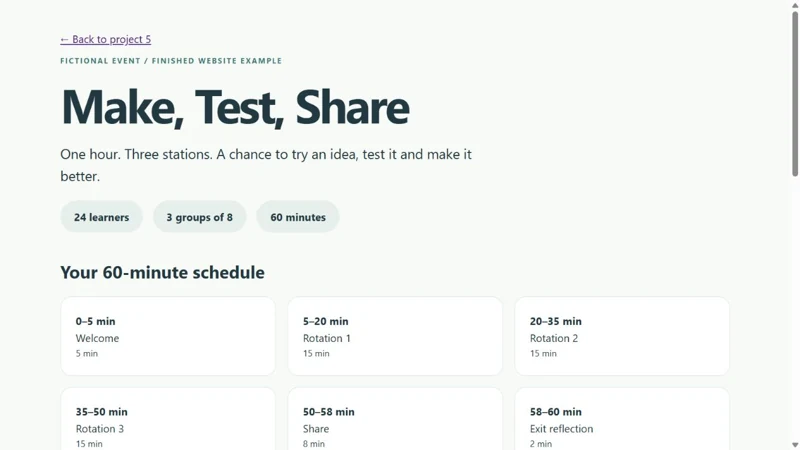
Finished example for comparison. Make your own version.
START HERE
Five steps to your first result
Choose your output
Pick one format: PowerPoint, PDF, Word or a one-page website. Open a workspace that can export it.
Give it the source website
Ask the assistant to open https://ai-in-action-octe-2026.web.app/maker-day.html. The downloadable source PDF is the alternate.
Request a finished asset
Use the matching format prompt. Specify a real file, audience, visuals and review before completion.
Open what it made
Check 24 learners, groups of eight, three stations and the 60-minute schedule against the source.
Revise and save
Use the 45-minute follow-up. Open the revised file and check every affected page or section.
Choose the asset you want
The source stays the same. Your choice changes the deliverable in the prompt.
Your PowerPoint prompt
Use your browser tools to open https://ai-in-action-octe-2026.web.app/maker-day.html. Read the original fictional Maker Day brief and list its source IDs before writing. Create a five-slide PowerPoint opening presentation in .pptx format as a finished downloadable asset for secondary educators. Preserve 24 learners, three groups of eight, three stations and the full 60-minute schedule. Label the event fictional. Keep station names, materials and reflection questions accurate. Do not invent a school, date, curriculum code or learning outcome. Use a clear teal, coral and blue design with readable type, useful visuals and generous spacing. Open or inspect the finished file and correct any mismatched facts before returning it. Explain one check you performed. A plan or chat response alone does not complete the job. If your account cannot browse or create the requested format, state the limitation and use the attached source PDF or choose a format it can actually export. Do not publish, send or sign up for anything.Download this prompt as TXT ↓
Your PDF prompt
Use your browser tools to open https://ai-in-action-octe-2026.web.app/maker-day.html. Read the original fictional Maker Day brief and list its source IDs before writing. Create a one-page student investigation passport in .pdf format with prediction, recording and reflection spaces as a finished downloadable asset for secondary educators. Preserve 24 learners, three groups of eight, three stations and the full 60-minute schedule. Label the event fictional. Keep station names, materials and reflection questions accurate. Do not invent a school, date, curriculum code or learning outcome. Use a clear teal, coral and blue design with readable type, useful visuals and generous spacing. Open or inspect the finished file and correct any mismatched facts before returning it. Explain one check you performed. A plan or chat response alone does not complete the job. If your account cannot browse or create the requested format, state the limitation and use the attached source PDF or choose a format it can actually export. Do not publish, send or sign up for anything.Download this prompt as TXT ↓
Your Word prompt
Use your browser tools to open https://ai-in-action-octe-2026.web.app/maker-day.html. Read the original fictional Maker Day brief and list its source IDs before writing. Create a two-page facilitator guide in .docx format with a timed rundown and a group rotation table as a finished downloadable asset for secondary educators. Preserve 24 learners, three groups of eight, three stations and the full 60-minute schedule. Label the event fictional. Keep station names, materials and reflection questions accurate. Do not invent a school, date, curriculum code or learning outcome. Use a clear teal, coral and blue design with readable type, useful visuals and generous spacing. Open or inspect the finished file and correct any mismatched facts before returning it. Explain one check you performed. A plan or chat response alone does not complete the job. If your account cannot browse or create the requested format, state the limitation and use the attached source PDF or choose a format it can actually export. Do not publish, send or sign up for anything.Download this prompt as TXT ↓
Your Website prompt
Use your browser tools to open https://ai-in-action-octe-2026.web.app/maker-day.html. Read the original fictional Maker Day brief and list its source IDs before writing. Create a responsive single-page event website in one self-contained .html file, with the schedule, three station cards and an accessible print button; use no login, backend or runtime AI service as a finished downloadable asset for secondary educators. Preserve 24 learners, three groups of eight, three stations and the full 60-minute schedule. Label the event fictional. Keep station names, materials and reflection questions accurate. Do not invent a school, date, curriculum code or learning outcome. Use a clear teal, coral and blue design with readable type, useful visuals and generous spacing. Open or inspect the finished file and correct any mismatched facts before returning it. Explain one check you performed. A plan or chat response alone does not complete the job. If your account cannot browse or create the requested format, state the limitation and use the attached source PDF or choose a format it can actually export. Do not publish, send or sign up for anything.Download this prompt as TXT ↓
Make one revision
Revise the finished asset for a 45-minute event: welcome 3 minutes, three rotations of 12 minutes, share 4 minutes and exit 2 minutes. Keep 24 learners, groups of eight, all three stations and the materials unchanged. Update every affected slide, page, table or section. Open or inspect the revised asset, check that the timing adds to 45 minutes and return the actual revised file with one sentence about the change.Download this prompt as TXT ↓
YOUR QUALITY CHECK
Does the result hold up?
An actual file opens in its intended format. Facts match the source. The first schedule totals 60 minutes; the revised one totals 45.
Take it a little further
Make a second format from the same source. Compare what changes between a presentation and a printable guide.
If your tool is slow or cannot export
Download Maker_Day_Source_Brief.pdf instead of browsing. Use the finished examples to inspect or revise an actual asset. Choose an export format your account supports.